
SOLVED: How to fix a bluetooth mouse that keeps disconnecting in Windows 8 & 8.1
So many perfectly good Bluetooth mice are sent back to the manufacturer for randomly disconnecting, when in fact they are working 100{a9f0d31f6175b3e4775e11a66c07db268fb74408d6095f6b46eeec420c0e9f62} fine. Most of the time it’s not the mouse, but Windows 8 that’s causing the problem. Here’s how I fixed it:
Search for Device Manager – select Human Interface Devices:
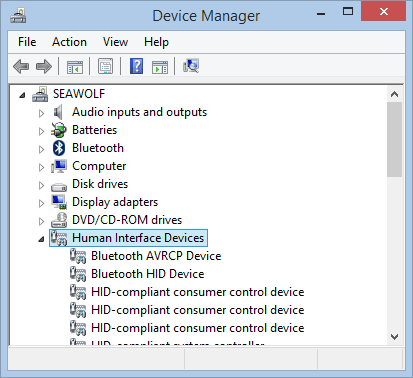
Go to Bluetooth AVRCP Device – Properties – Power Management –
then deselect “Allow the computer to turn off this device to save power”
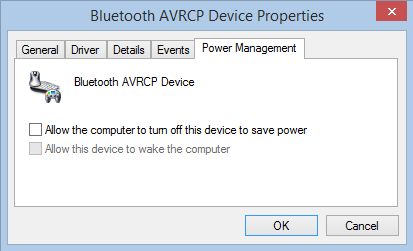
You might also need to do this for Bluetooth HID Device and Microsoft Hardware Bluetooth Device if you have a Microsoft mouse.
Voila! It should stay connected from now on. You might need to remember to manually switch off your mouse from now on to conserve batteries when you’re not using it.
Borik
Works for win 10 as well, had to do it for Intel Wireless Bluetooth
Martin Yates
Ddicota Bluetooth mouse working fine now, thank you !
olivia
Woohoo!!!
Tim
Are you saying that I need to buy a unifying receiver to solve this?
Will Segatto
Found a solution that seems to be working for people, which is basically:
remove/forget your mouse in your computer’s Bluetooth settings
plug in the Unifying Receiver, and when it’s ready, add your mouse to it in Logitech Options. This will let the mouse’s internal firmware update
now you can remove the receiver, and re-add your mouse in your computer’s Bluetooth settings, and it should work fine
Phil Austin
Great tip re bluetooth mouse losing power.
Jean
Thanks for your suggestions, but my cursor still freezes and lags when my laptop is on battery power.
Logitech MX Master
Surface Book 2 15″
olivia
There might be a setting in the BIOS that you can change to sufficiently power to your USB ports while on battery power.
manny
Dealing with the same issue now. I bought a dongle that had the same option so i turned both off https://imgur.com/b2UNXIi
olivia
Thanks for the tip!
Joe
On my Lenovo Flex 5 with built-in Bluetooth, it is in Device Manager; Bluetooth; Intel(R) Wireless Bluetooth(R).
I do with M$ would do a better job deciding their default settings. Or maybe it was Lenovo’s doing. Anyway, thanks for ‘fixing’ by broken mouse.
Vlad
Will test this with my new Logitech MX master S2. Hope it works, as it freezes sometimes ^^
Vlad
Havent had problems so far! 😉 Thanks a lot man! Now I dont even have to use that stupid unifiyng reciever! ^^
Have shared your solution as part of one of my problems on the logitech forums!
https://community.logitech.com/s/question/0D55A000079FjYNSA0/logitech-unifying-reciever-driver-error?t=1509530511653
olivia
Glad to hear it!
Jeff
well done, works on windows 7 as well. we all appreciate the the fact that the people who know are willing to share with the people who don’t
Massive
Just in case anyone is searching this thread for Windows 10 – still go to device manager and human interface Devices then look for Bluetooth Low Energy GATT compliant HID device, click on that and then you can uncheck the field under power management as shown above.
aaron
I did all that and it worked better but still disconnected occasionally. I got a Logitech mouse and it works great. You would think Microsoft could get it right since they make both the mouse and the OS. Ah well
Dick
I had a similar problem with my Dell 2-in-1 after upgrading to Windows 10. I found that I also had to go to Device Manager / Human Interface Devices / Airplane Mode Switch / Power Management and uncheck “Allow the computer to turn off this device to save power.” Apparently Windows 10 was randomly deciding to switch me to airplane mode, and then of course the bluetooth would be disabled.
} bird {
Thanks Oswaldo! I can’t tell you how many times I’ve forgotten how to fix this and returned to the page! Haha
Oswaldo
Many thanks for spreading your knowledge and making this particular problem so easy to understand! I truly appreciate ethically-minded professionals. Good luck!